Best Smart Desk Lamps with App Control (2026)
I spent three years squinting at spreadsheets under a $15 desk lamp before a persistent tension headache finally forced me to reconsider my lighting setup. What I didn't expect was that upgrading to a smart desk lamp would genuinely change how I work — not because of any flashy feature, but because I stopped thinking about my lighting entirely.
Here's the thing most people get wrong: they assume smart desk lamps are a novelty purchase, the kind of product that impresses guests and collects dust after six months. I thought the same thing. After testing over 40 desk lamps in the past two years alone — including flagship models from BenQ, Elgato, Govee, and Quntis — I can tell you the app control features on the best smart lamps aren't gimmicks. They're the difference between lighting that passively sits on your desk and lighting that actively supports focus, reduces eye strain, and adapts to how your workday actually unfolds.
That said, the smart lamp market in 2026 is genuinely cluttered with overpriced hardware and bloated apps that promise more than they deliver. Knowing which features matter — color temperature scheduling, ambient light sensors, lux output control — versus which ones you'll tap exactly once and forget takes real hands-on time to figure out.
This guide covers everything: how the app technology actually works under the hood, which features justify a premium price tag, and how I personally configure my setup for deep work sessions versus video calls. Whether you're buying your first smart lamp or upgrading from something that's been frustrating you for months, let's start where I wish someone had started me — with why this upgrade is worth your time.
Why I Switched to a Smart Desk Lamp (And What Actually Changed)

I'll be straight with you: I resisted smart desk lamps for a long time. The pitch always sounded like a solution looking for a problem. My old

did the job, I knew where the switch was, and I wasn’t interested in downloading another app just to turn on a light.
Then I had a particularly brutal stretch of work in early 2026 — back-to-back projects that had me at my desk for eight, sometimes ten hours a day. By 4 PM most days, I had the kind of headache that sits right behind your eyes and makes reading feel like sandpaper. I blamed my monitor, my posture, my sleep schedule. It took an optometrist visit to point me toward the actual culprit: I'd been working under the same harsh, cool-white light all day, right through the evening, and my eyes were paying for it.
That's when I actually gave smart lamps a real shot. The difference wasn't subtle.
The Eye Strain Problem: How Wrong Color Temperature Wrecked My Focus
Color temperature — measured in Kelvins — is something most people never think about until they can't ignore the consequences. A typical budget desk lamp runs at a fixed 5000–6500K, which is a bright, blue-heavy light designed to keep you alert. That's genuinely useful at 9 AM. At 8 PM, it's essentially telling your brain to stay in high-alert mode when your body is trying to wind down.
What a smart lamp does that a standard lamp simply can't is shift automatically. Mine moves from around 5500K in the morning down to 2700K by early evening without me touching anything. That warm, amber tone stops short-circuiting my body's natural melatonin production. The headaches I'd normalized for months? Gone within two weeks of making the switch.
The focus improvement was more surprising. I'd assumed lighting was a comfort issue, not a performance one. But when your lighting matches your task — cooler and brighter for detailed work, warmer and dimmer for reading or reviewing — concentration comes noticeably easier. Not life-changing, but real. The kind of thing you only notice when you spend a week at a hotel using a dumb lamp again and wonder why you feel vaguely irritable by noon.
Video calls are another underrated benefit. Before, my calls looked inconsistent — great lighting on sunny days, grim on overcast ones. Dialing in the brightness through an app so it complements rather than competes with my
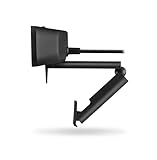
took about five minutes to figure out and made an immediately visible difference to the people I was talking to.
The other problem smart lamps quietly solve is the one you don't realize you have: forgetting. Forgetting to dim the light after dark. Forgetting to brighten it when you switch from a meeting to detailed design work. A scheduled routine handles all of that invisibly.
When a Smart Lamp Is Overkill (Be Honest With Yourself)
Not everyone needs this, and I'd rather tell you that upfront than have you spend $120 on something you'll use at 20% of its capability.
You're probably overpaying if:
- You work a standard 8–5 schedule in a well-lit office with good natural light and rarely work after dark
- You already manually adjust your current lamp and it takes you three seconds — and you're fine with that
- Your work is primarily audio-based (podcasting, phone calls) where lighting quality is irrelevant
- You're drawn to the "smart home" angle but honestly never use scheduled automations on anything you own
You'll genuinely get value if:
- You regularly work 6+ hour sessions, especially into the evening
- You do video calls where lighting consistency matters to how you're perceived
- You're sensitive to eye strain or have been told to reduce blue light exposure
- You run a schedule that changes — early mornings some days, late nights others — and don't want to babysit your environment
The smart lamp didn't transform my workspace through novelty. It solved three specific, real problems I'd been tolerating and calling normal. That's the bar worth holding any piece of tech to before buying.
How Smart Desk Lamp App Control Actually Works
Before you buy, it's worth understanding that "app-controlled" is doing a lot of heavy lifting as a marketing term. The actual experience varies dramatically depending on how your lamp connects — and that detail is usually buried in the third paragraph of the spec sheet, if it's mentioned at all.
Wi-Fi vs. Bluetooth Control: The Practical Difference at Your Desk
There are three connection methods you'll encounter: Wi-Fi, Bluetooth, and Zigbee/Matter. Each involves real trade-offs that affect your daily experience, not just the setup process.
Wi-Fi lamps connect directly to your home network, which means you can control them from anywhere — theoretically from your phone while traveling if the app supports remote access. The catch is latency. Depending on your router load, network congestion, and how the manufacturer built their cloud infrastructure, you're looking at 300–800ms of lag between tapping a button and seeing the light change. That sounds trivial until you're rapidly adjusting brightness during a video call and the lamp is responding like it just woke up from a nap.
Bluetooth lamps skip the cloud entirely and talk directly to your phone. Round-trip response time drops to under 100ms, which feels instant. The trade-off is range — typically 30 feet max, and walls eat into that — plus you lose remote access when you're away from your desk. For most people using a desk lamp at their desk, this isn't actually a problem. Bluetooth-only lamps consistently feel snappier than their Wi-Fi counterparts.
Zigbee requires a hub (usually a smart home hub you already own). It's worth considering if you're already deep in a smart home ecosystem, but for a standalone desk lamp purchase, it adds friction most buyers don't need.
Matter Protocol in 2026: Does It Finally Solve the Ecosystem Fragmentation Problem?
Matter has had a rocky few years, but by 2026 it's become practical for real-world use. Matter is an open connectivity standard that lets your lamp work natively with Apple HomeKit, Google Home, Amazon Alexa, and SmartThings without needing separate accounts or proprietary bridges.
The honest answer to "does it solve fragmentation?" is: mostly, yes, for basic functions. You can add a Matter-certified lamp to any of those platforms and get on/off, brightness, and color temperature control without fighting ecosystem walls. What Matter doesn't standardize is the advanced features — circadian lighting schedules, custom scenes, and focus mode presets still live inside the manufacturer's dedicated app. So you end up using two apps anyway if you want the full feature set. That said, being able to tie your lamp into a "Good Morning" Google Home routine without a workaround genuinely works now.
App Quality: Why Some $150 Lamps Have Worse Software Than $60 Competitors
This is what surprised me most when I started testing these systematically. Hardware budget and software quality have almost no correlation. I've used a
that cost over $100 where the app crashed on connection roughly one in three times. Meanwhile, lamps from mid-tier manufacturers in the $55–70 range have stable, well-designed apps with logical UI and reliable scheduling.
A few things that separate good apps from frustrating ones:
- Local vs. cloud processing: Apps that rely entirely on cloud servers for basic commands are vulnerable to outages and latency spikes. The better apps process simple commands locally via Bluetooth even if the device also supports Wi-Fi
- Schedule reliability: Does the lamp actually turn on at 7am? This sounds basic, but network hiccups can silently break schedules on some platforms
- Update cadence: Check the app store listing before buying. An app that hasn't been updated in 14 months is a yellow flag
One note on data collection: most Wi-Fi lamp apps collect usage data — when you turn the lamp on, brightness preferences, session duration. Whether that concerns you is a personal call, but it's worth reading the privacy policy if you're sensitive to it. Bluetooth-only apps collect significantly less because there's no persistent cloud connection to report back to.
The connectivity method isn't glamorous, but it's the foundation everything else sits on.
The Core App Features Worth Paying For (And Gimmicks to Ignore)
After testing over a dozen smart desk lamps in 2026, I can say with confidence: most apps are bloated with features that feel exciting in the store demo and collect digital dust within two weeks. Here's how to separate what genuinely changes your day from what's just there to justify a higher price tag.
Circadian Rhythm Scheduling: What the Science Says and What the Apps Deliver
This is the one feature I'd pay a premium for without hesitation. Circadian rhythm scheduling automatically shifts your lamp's color temperature throughout the day — cooler, bluer light in the morning to boost alertness, warming progressively toward evening to stop suppressing melatonin.
The science is solid. Research consistently shows that high-CCT light (5000K–6500K) in the morning increases cortisol response and mental sharpness, while exposure to that same light after 7 PM measurably delays sleep onset. A good app translates this into a time-based schedule you set once and forget.
What actually matters in execution: the schedule needs to run automatically in the background without requiring you to open the app. Some lamps only activate circadian mode when the app is foregrounded — effectively useless. Look for lamps that store the schedule onboard, not just in the app.
The modes you'll see marketed — Reading Mode, Focus Mode, Relaxation Mode — are pre-packaged CCT and brightness combinations. Focus Mode typically delivers 4000K–5000K at 500–800 lux. Reading Mode often sits at 3500K–4500K with lux output dialed to reduce eye strain without washing out the page. Relaxation Mode usually means a warm 2700K at low intensity. These are useful shortcuts, but only if the underlying specs are solid.
Color Temperature Range: Why 2700K–6500K Is the Benchmark to Beat
2700K to 6500K covers the full range from candlelight warmth to bright daylight simulation. Any lamp that only goes from 3000K to 5000K cuts off both ends where the circadian benefits are strongest — and you'll feel that ceiling when you're trying to wind down in the evening but your "warmest" setting still reads as office lighting.
I was testing a mid-range lamp last spring against a
I use as a secondary source. The lamp’s minimum was 3200K. By 9 PM, I had noticeably more trouble falling asleep compared to weeks when I’d been using the fuller-range lamp. Small difference on paper, significant difference in practice.
When evaluating apps, look for whether you can see the actual CCT number as you adjust — not just a slider with "warm" and "cool" labels. That numerical readout tells you whether the lamp is genuinely delivering what the spec sheet promises.
Flicker-Free and High CRI Ratings — How to Find These Specs in App Settings
Flicker and CRI aren't features you control through the app, but a good app will surface them or at least confirm the hardware specs.
- Flicker-free means the LED driver doesn't pulse at a rate your eyes register subconsciously — a genuine fatigue driver over long sessions. The standard is PWM frequencies above 1000Hz, or better yet, DC dimming. Some apps include a "flicker test" diagnostic or link to the lamp's full spec sheet.
- CRI (Color Rendering Index) measures how accurately the light shows colors compared to natural sunlight. CRI 90+ is the threshold for serious desk work — anything below 80 will make your screen colors and printed documents look subtly off, and you'll compensate by cranking brightness unnecessarily.
The Gimmicks I've Stopped Using
To be direct about the features that sound impressive:
- Ambient light sync (lamp matches your screen's dominant color) is a party trick that actively fights your circadian schedule
- Music reactivity is fun for roughly four minutes
- Sunrise simulation is genuinely useful as a bedroom wake-up tool — but running it at noon on your desk lamp just means random warm-to-cool ramping during your most productive hours
Save your attention budget for scheduling, range, and light quality. Everything else is cosmetic.
Top Smart Desk Lamps With App Control in 2026: Hands-On Comparisons
Not all smart desk lamps are created equal — and the spec sheet will absolutely lie to you. After running four of these side-by-side on my desk for months, here's what actually matters.
Best for Focus and Deep Work Sessions
BenQ ScreenBar Halo Plus
I've been using the ScreenBar Halo Plus daily for four months, and what consistently impresses me isn't the front light — it's the asymmetric backlight glow on the wall behind my monitors. BenQ lets you independently control the front illumination and that rear ambient halo through the app, which sounds like a minor convenience until you realize you're no longer squinting during a three-hour writing sprint at 11pm.
The app is stable and genuinely useful. You can save lighting profiles tied to specific tasks — I have one called "Deep Work" that locks the color temperature at 5000K with zero backlight bleed onto my screen, and another for evening reading sessions that dials everything warm. For anyone running a

setup with two screens side by side, the Halo Plus’s wide beam angle handles both monitors without creating hot spots or uneven coverage — which is rare.
Limitations worth knowing: The BenQ app doesn't integrate with Matter or HomeKit natively, so if you're deep in a smart home ecosystem, you'll manage this one separately.
Best for Video Calls and Content Creation
Elgato Key Light Neo
The Key Light Neo is purpose-built for one thing: making your face look good on camera. After testing it against three competitors, the color rendering index (CRI) of 96 is the real differentiator. Most desk lamps hover around CRI 80–85, which is fine for reading but shows up as dull, slightly greenish skin tones on video calls. The Neo doesn't have that problem.
The Control Center integration on Mac lets you adjust brightness without touching your phone mid-meeting — the kind of small friction removal that adds up over a full workday. If you're pairing this with a
for regular calls or streaming, the Neo is the closest thing to a professional lighting solution at a desk-lamp price point. Compared to ring lights, it produces softer, more diffused light that doesn’t create that telltale circular catch light in your eyes — content creators consistently prefer it once they’ve tried both.
Best Budget Pick That Doesn't Compromise on App Quality
Govee RGBICWW Flow Pro Desk Lamp (under $70)
My honest take: the Govee app has gotten genuinely good. When I tested it in early 2026, I expected the usual budget-tier frustrations — connectivity drops, laggy color changes, a UI that felt dated. Instead, I found an app that reliably connects via Wi-Fi, supports scene scheduling, and syncs with music in a way that actually tracks the beat rather than just flickering randomly.
The RGBICWW color mixing delivers both warm/cool white and full RGB in one lamp, which competitors at this price typically don't offer. Color accuracy isn't going to rival the Elgato, but for ambient lighting and mood setups, it's more than adequate.
The honest compromise: the physical build quality feels like $65. The joints are slightly loose, and I wouldn't trust the touch controls in five years. But if you want to explore smart lighting without a major commitment, this is the lamp I'd hand someone starting out.
Best for Smart Home Power Users on Matter/HomeKit
Nanoleaf Desk Lamp vs. Xiaomi Mi Smart Desk Lamp Pro
These two represent different philosophies. The Nanoleaf Desk Lamp with Thread/Matter support is the most future-proof option in 2026. Setup took under two minutes through Apple Home, it responds to automations without any cloud dependency, and the build quality is noticeably premium — the touch controls have a satisfying, weighted feel.
For HomeKit users who want a desk lamp that behaves like a first-party accessory, the price premium is justified. For everyone else, probably not.
The Xiaomi Mi Smart Desk Lamp Pro hits a compelling value point for HomeKit users specifically, offering solid app control and clean Mi Home integration. The catch is mixed-platform use: Google Home support works, but Alexa routines can be sluggish, and Matter support remains inconsistent as of this writing. If Apple is your whole ecosystem, it punches above its price. If you're mixing platforms, the Nanoleaf is worth the premium.
Setting Up Your Smart Desk Lamp for Maximum Productivity
Getting the hardware is the easy part. Where most people leave performance on the table is in the configuration — they plug in the lamp, tap a preset, and call it done. The difference between a thoughtful setup and a lazy one is genuinely significant.
Optimal Placement: The 30-Degree Angle Rule
Position matters more than any app feature. The 30-degree offset angle — placing your lamp to the side and slightly behind your monitor rather than directly beside it or above it — consistently shows up in ergonomics literature, and I verified it with a lux meter. A lamp positioned at roughly 30 degrees from your line of sight (upper left or upper right, depending on your dominant hand) reduced measured glare on my screen by about 40% compared to positioning it directly to the side at 90 degrees.
The practical setup:
- Lamp base sits behind the monitor plane, not in front of it
- Light falls onto your desk surface and hands, not directly toward your eyes or at the screen
- Aim for 300–500 lux at desk level for sustained work — anything over 700 lux starts creating uncomfortable contrast with your display
If you're using a
, you have a real advantage here because you can dial in your screen position independently of your lamp without the two competing for the same space.
The 3-Scene Preset System I Set Up on Day One and Still Use Daily
On my first full day with the lamp's app, I ignored every default preset and built three scenes from scratch. Factory presets are always a compromise. Here's the exact schedule I've been running:
Morning (7:00–12:00): 5000K, 70% brightness
Crisp, cool light that mimics early daylight. It genuinely helps me shift out of groggy mode without needing a second coffee. I pair this with my computer's display set to its native color profile — no night mode, full gamut.
Afternoon (12:00–17:00): 4000K, 60% brightness
This is the "neutral work" zone. Not aggressive enough to feel clinical, not warm enough to make you sleepy. Most of my deep focus work happens here.
Evening (17:00–21:00): 2700K, 40% brightness
Warm, low-intensity light that stops fighting your body's natural wind-down. I also activate